Contents
World Cup 2026 Excel schedule spreadsheet
We are back with the “Excel World Cup 2026 sweepstake” (or Office Pool), which we are re-launching after the 2018 and 2022 editions. This file is your ultimate FIFA World Cup 2026 Excel schedule spreadsheet and score predictor tool..
Since we released the first edition 10 years ago (the Euro Cup 2016 spreadsheet) we have been constantly releasing different Excel templates, both for National Teams (Copa América Excel, Africa Cup Excel,Asia Cup Excel, Gold Cup Excel, Olympic Games Football Excel) and for Club Competitions (Spanish League Excel, Premier League Excel, Champions League Excel, Europa League Excel, Conference League Excel, Libertadores and Sudamericana Excel).


When major international football tournaments arrive, people usually set up the typical office pools at work, in bars, with their groups of friends, or with family. One of the main purposes of this Excel template is to help you manage your group’s sweepstake for the FIFA USA-Canada-Mexico 2026 World Cup. It can also be used as a FIFA World Cup 2026 calculator, Excel World Cup simulator, fixture schedule or printable bracket.
The World Cup draw will take place on December 5, 2025, but the last six teams will not be known until the end of March 2026.

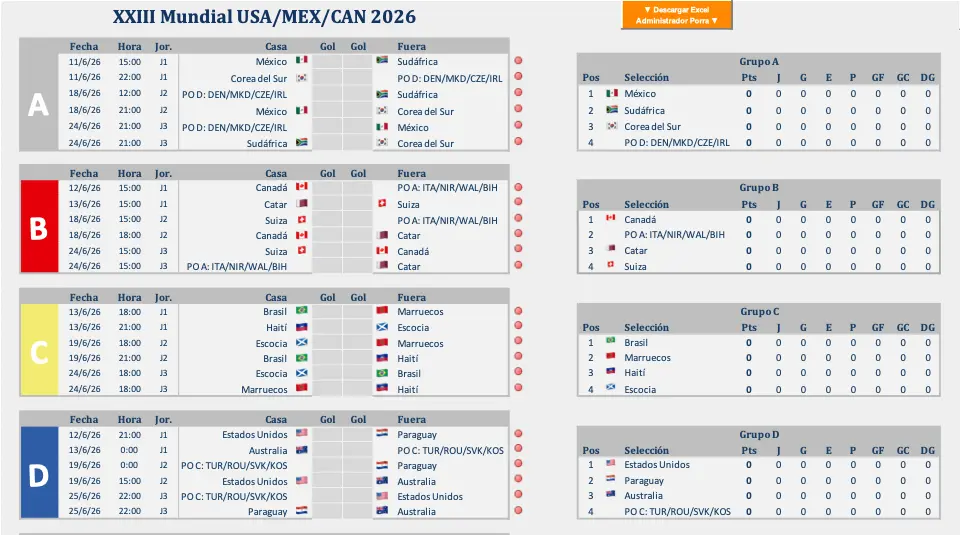
Since 2016 when we published the first file until this year we have improved the use of the excel. For example 4 years ago in case of a draw in a group you had to change a result if you didn’t like the order of the group. Now in case of a draw you can select the order in a group. Another new feature is that you can select the times according to the country you have chosen or you can select your UTC zone, also we’ve added the flags of the countries participating in the group stage.
How does the Excel World Cup 2026 simulator works?
The operation is very simple:
- In the Group Stage, you only need to fill in the grey boxes with the match results you predict. In case of a tie in the group standings between two or more teams, you can manually select the final order of those teams.
- From the Round of 32 onwards, the matchups are set automatically. You must then fill in the grey boxes with the results. If the result you enter is a draw, two more grey boxes will appear next to the score to allow you to resolve the tie (e.g., penalties or extra time scores).
- Finally, you must write down your predictions for the best players and the top goalscorers.
- We have included a video below explaining how the file works.
World Cup 2026 Excel Features


- Enter Results: With this excel file, you can input the scores for all 104 World Cup matches, from the group stage right through to the final.
- Update Standings: The group stage tables automatically adjust according to the results entered for the group matches.
- Tie-Breaker control: At the end of the group stage, in case of a tie between two or more teams on the classification criteria, you can manually decide the final ranking for those tied teams within that group.
- World Cup 2026 simulator: You can simulate all the group stage matches, and the knockout stage matchups (Round of 32, Round of 16, Quarter-Finals, Semi-Finals, and Final) will be set automatically. Complete the knockout results up to the great World Cup 2026 Final.
- Organize or join a World Cup 2026 sweepstake: You can organize a sweepstake/office pool with your friends, colleagues, or family using the participant file and the administrator file. If you are the organizer, you can see instructions on how to set it up here.
- Select time zones: You can select the time zone of the participating countries or the time zone where you are located.
- Bilingual: Choose the language between Spanish and English within the same file, ensuring the language is not a barrier when organizing an international office pool.
- Printable fixture bracket: View the complete FIFA World Cup 2026 group stage and knockout bracket at a glance on the Fixture sheet. The bracket is fully printable — just print the sheet directly from Excel to use it as a wall chart or share it as a PDF. It also features an automatic bar chart showing how far each team progresses based on your predictions.
- Predictor (new): The file includes a separate sheet that allows you to predict which round each national team will reach, independent of the results entered on the main Worldcup sheet. This is a new, optional feature added to this edition for a more complete and fun experience.
World Cup 2026 sweepstake Excel file
This FIFA World Cup 2026 Excel template is also designed to run a World Cup 2026 office pool (also known globally as an sweepstake, score predictor, or world cup worksheet).
It also includes a printable fixture bracket: Fixture sheet lets you view the entire FIFA World Cup 2026 tournament at a glance — and you can print it directly from Excel as a wall chart or PDF
The system consists of two separate files:
- One for the participants of the World Cup 2026 excel sweepstake.
- Another for the administrator, which allows them to input all the participants’ predictions, view the sweepstake standings directly within the same excel spreadsheet, and review each participant’s daily forecasts.
You can download both files below.
Download Excel file World Cup pool 2026
Comments on the Excel World Cup Pool 2026
- Last update: 01/04/2026 After all nations are known.
- This FIFA World Cup 2026 Excel template serves as a fixture schedule spreadsheet, score predictor, and participant file for the USA, Mexico and Canada FIFA World Cup sweepstake. The Fixture and Worldcup sheets are fully printable: print to PDF directly from Excel to use as a wall chart.
- Downloable file contains an .xlsx file. The download is an Excel file and does not contain any macros. All calculations are performed using standard Excel formulas.
- You can find a video below this text demonstrating how the file works. You can select English in audio.
- Although this is a bilingual file where you can select the language (English or Spanish), we have also published a dedicated Spanish version (World Cup Excel).

Additionally, for those of you who want to organize and administer the World Cup 2026 Excel sweepstake or the Club World Cup Excel office pool with your group, you can also use the sweepstake administrator file along with the complete instructions.
Download the ADMINISTRATOR file
Comments to the administrator’s file:
- Last update: 15/04/2026
- There are several versions available depending on the desired number of participants. The version featured in this post includes space for up to 5 players. If you require a version for more than 5 participants, please click the button to access the different options.
- The download package includes the .xlsx Excel file designed to admin a World Cup 2026 sweepstake. This file contains several sheets: a home page, a sheet for entering the actual results of the World Cup, a Office Pool Administration sheet, a sheet for the Overall Standings, a sheet for the Daily Standings, a sheet for Daily Predictions by participants, a Fixture/Bracket sheet (dynamically updated based on participant predictions), and a Sweepstake Statistics sheet (Note: This sheet only functions in Excel 2021 or later).
- Like the participant file, this administrator file is created only using formulas and doesn’t contain any macros.
- Explanation of the scoring system: provides a detailed explanation of how the scoring system works.
- We have created a video tutorial on how the file works (You can select English in audio). This video provides a visual explanation. You can also watch the video at the bottom of this page.
- Frequently Asked Questions when organizing a World Cup 2026 office pool in Excel.

THERE IS NO A BETTER WAY to set the scores, because each one has its pros and cons, so I encourage you to comment on how you are going to put them in your group with a screenshot so that people can see it, and also if you want to comment.
As always, any correction, suggestion, comment you want to make is welcome. You can comment anything related to the World Cup, the rules you use in your group, where you are from, how many people you are, how you make the bets, suggest scores, etc. Thank you very much in advance.
ENJOY!